You can apply a discount to any item.
1. Open the Item
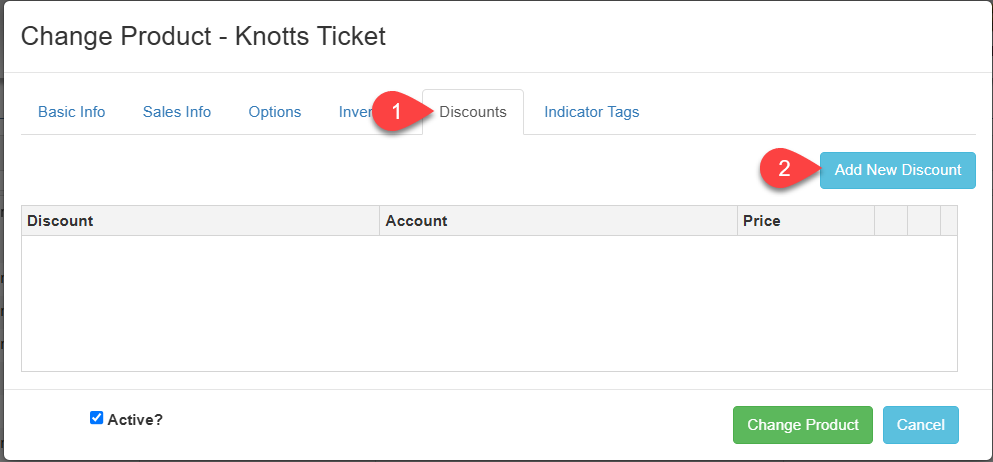
2. Click on the "Discount" tab
3. Click on the blue "Add New Discount" button on the top right
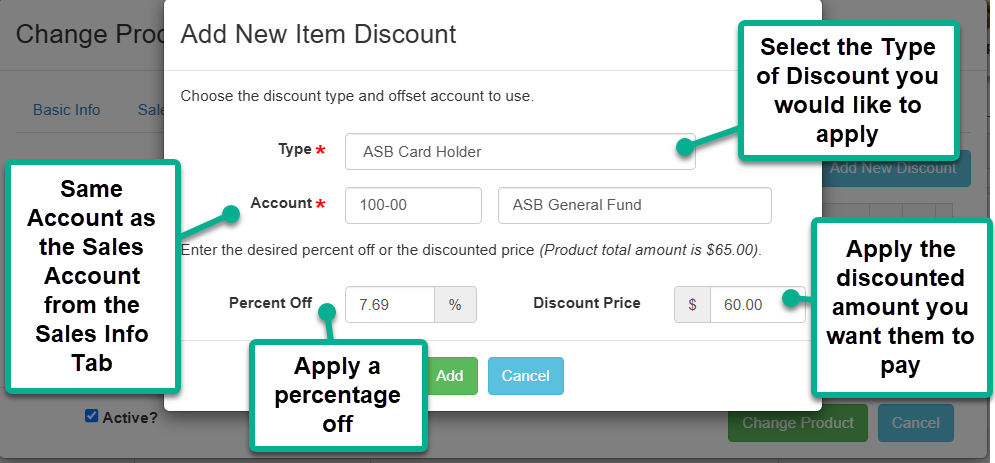
4. Select the "Type" of discount you would like to apply - there are 3 choices - ASB Card Holder, Student, and Teacher
5. Fill in the same account that you have the sales are recording in from your "Sales Info" tab
6. Choose either a percentage off that you would like applied OR you can choose what the discounted price will be.
***important note - the "Discount Price" is the amount you would like them to pay NOT the discount off
i.e. $5 off the total price. If the full price item is $65.00 and you want them to pay $60.00 after the discount
$60.00 is what you enter in the "Discount Price" field.
7. Click the green "Add" button to save the discount.
8. When you are finished editing your item make sure to click "Change Product" to save all of your changes to the item.
Note: To edit/delete an existing discount on an item, click the desired discount to highlight it, then click either Change or Remove (trash can) buttons