
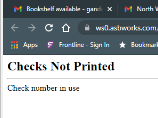
If you’re seeing the error message below, “Checks Not Printed, Check number in use,” it may be caused by an older version of Adobe PDF installed on your computer.
Please try uninstalling Adobe and then reinstalling the most recent version. This often resolves the issue.
________________________________________________________________________________________________________________
If you’re seeing a different error message NOT in a white screen, it means the Adobe Acrobat plug-in is enabled and will need to be disabled.
To do this:
Click the three dots in the top-right corner of the browser → Extensions → Manage Extensions → turn off Adobe by using the blue toggle and moving it to the left.
Once that’s done, please try printing your checks again.
